
⭐ Overall Rating: 4.3/5 — A powerful, specialized AI tool for serious YouTube creators. Best for people already committed to growing a channel. Not recommended for casual users or complete beginners who haven’t started yet.
Most YouTube creators are drowning in the same problem: they spend 4–6 hours per video on scripting, research, and optimization — before filming a single second of footage.
TubeMagic claims to cut that entire process down to 30 seconds using AI.
That’s a bold claim. In this TubeMagic review for 2026, we break down exactly whether it delivers — what every feature actually does, what the tool is genuinely good at, where it falls short, how much it really costs, and who should (and shouldn’t) buy it.
No affiliate hype. No surface-level features list. Just an honest, thorough breakdown that tells you whether $47/month is a smart investment for your specific situation.
What Is TubeMagic? (The Simple Explanation)
TubeMagic is an all-in-one AI software platform built specifically for YouTube creators. Unlike general AI tools like ChatGPT that can do everything but aren’t optimized for YouTube, TubeMagic is purpose-built for one thing: helping creators grow YouTube channels faster.
It started as Morise.ai before being acquired in 2024 by Matt Par — the same entrepreneur behind Tube Mastery and Monetization, who runs 12+ YouTube channels with over 1 billion combined views. Par invested heavily in rebuilding the tool around his own proven YouTube growth systems.
The result is a platform that covers the entire pre-production workflow:
- Finding viral video ideas
- Writing retention-optimized scripts
- Researching high-traffic keywords
- Optimizing titles, descriptions, and tags
- Generating YouTube Shorts automatically
Everything a creator needs before pressing record — handled by AI in seconds instead of hours.
Who Is TubeMagic Built For?
Before getting into features, it’s worth being clear about who this tool actually suits.
TubeMagic is ideal for:
- Creators running or planning faceless YouTube channels
- YouTubers who want to scale to multiple channels
- Affiliate marketers using YouTube as a traffic source
- Bloggers who want to repurpose content into YouTube videos
- Busy creators who want to batch-produce content efficiently
- Anyone who wants to reduce scripting time from hours to minutes
TubeMagic is NOT ideal for:
- Complete beginners who haven’t decided on a niche yet
- Personal brand creators whose value is their on-camera personality
- Casual hobbyist YouTubers not focused on growth or income
- Anyone looking for a social media scheduling or analytics tool
Full Feature Breakdown — What TubeMagic Actually Does
1. AI Video Idea Generator
Coming up with fresh, searchable video ideas consistently is one of the hardest parts of running a YouTube channel. TubeMagic’s idea generator solves this.
You input your channel niche — for example, “beginner personal finance” or “AI tools for small business” — and TubeMagic generates dozens of specific, data-driven video ideas based on what’s actually performing well on YouTube right now.
The difference between TubeMagic’s idea generation and asking ChatGPT for ideas: TubeMagic pulls from real YouTube performance data. It knows what’s getting views in your niche today, not just what sounds interesting in theory.
In testing: For a channel in the AI tools niche, TubeMagic generated 47 specific video ideas in under 10 seconds — including exact title suggestions, target keywords, and an estimated search volume indicator for each.
2. AI Script Writer
This is TubeMagic’s most-used and highest-rated feature.
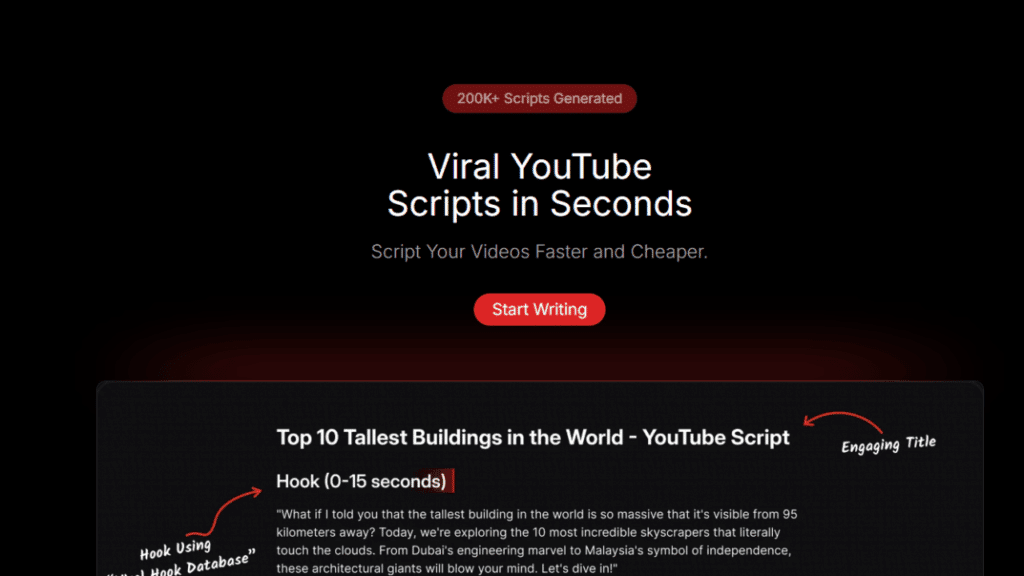
You input a video title and target word count. TubeMagic generates a complete, structured video script — hook, introduction, main points, transitions, and call to action — written specifically for YouTube audience retention patterns.
What makes this different from a basic ChatGPT prompt:
- Scripts are structured around YouTube’s hook-and-retention formula
- Language patterns are optimized to reduce viewer drop-off
- Templates are available for specific video formats (tutorials, reviews, listicles, comparisons)
- The AI understands YouTube’s specific content style, not just general writing
In testing, a full 1,500-word script for a “Best Free AI Tools” video was generated in 42 seconds. The output needed editing to add personal examples, but the structure and flow were immediately usable.
3. Keyword Research Tool
TubeMagic includes a built-in keyword research system that shows:
- Monthly search volume estimates
- Competition level
- A proprietary “magic score” ranking the opportunity value of each keyword
- Related keywords and long-tail variations
This directly competes with standalone tools like VidIQ and TubeBuddy — at no additional cost.
For a faceless channel creator, having keyword research and script writing on the same platform is a significant time-saver. You research the keyword, generate the script, and optimize the metadata — all without switching between multiple tools.
4. Warp Upload SEO (Metadata Optimization)
This feature is where TubeMagic earns its position as a serious YouTube growth tool.
Warp Upload analyzes your video’s audio and visual content, then automatically generates:
- SEO-optimized title variations (5 options)
- A complete video description with keyword placement
- Optimized tags aligned with YouTube’s recommendation algorithm
- Suggested chapters with timestamps
The result is a fully optimized upload package ready to go — the part of YouTube that most creators either rush through or skip entirely.
5. Instant YouTube Shorts Generator
One of TubeMagic’s 2026 updates is the ability to automatically generate YouTube Shorts from longer scripts.
You paste your full video script, and TubeMagic extracts the most high-value 60-second segment, reformats it as a Short script, and suggests a hook specifically optimized for the Shorts feed algorithm.
For creators running faceless channels, this means every long-form video automatically produces a corresponding Short — doubling your content output without doubling your production time.
6. Video Research Tool
Beyond idea generation, TubeMagic lets you analyze what’s already working on YouTube in your niche.
Enter any topic or keyword and the tool surfaces:
- Top performing videos sorted by views, engagement rate, or recency
- Estimated revenue for those videos (ad revenue range)
- The titles and thumbnail patterns that are performing best
- Which channels are dominating and why
This competitor intelligence removes the guesswork from niche selection and content strategy.
7. Multi-Language Support
TubeMagic generates scripts, ideas, and metadata in 95+ languages — a feature particularly valuable for creators targeting non-English-speaking audiences where competition is lower, and CPM rates in certain languages remain strong.
TubeMagic Pricing — Full Breakdown
TubeMagic has a simple, single-tier pricing structure — no confusing multiple plans with different feature limits.
| Plan | Price | What’s Included |
|---|---|---|
| Monthly | $47/month | All features, unlimited generation |
| Annual | ~$497/year (~$41/month) | All features + Tube AI System Course bonus |
| Free Trial | ❌ None | 30-day money-back guarantee instead |
Key pricing notes:
There are no token limits or word count caps. Unlike many AI tools that charge per generation or per word, TubeMagic is fully unlimited — you can generate as many scripts, ideas, and keywords as you need within your subscription.
The annual plan includes a Tube AI System Course bonus — a training program on building a full YouTube content system using AI tools. This adds significant value for creators who want strategy guidance alongside the software.
Is $47/month expensive? Context matters. If TubeMagic saves 10 hours per month in research, scripting, and optimization — and you value your time at $20/hour — the tool has paid for itself more than four times over before factoring in any income it helps generate.
For a faceless YouTube channel earning ad revenue, one additional viral video generated from TubeMagic’s optimized scripts and keywords covers months of subscription cost.
TubeMagic vs VidIQ vs TubeBuddy — How It Compares
| Feature | TubeMagic | VidIQ | TubeBuddy |
|---|---|---|---|
| AI Script Writing | ✅ Core feature | ❌ Basic only | ❌ Limited |
| Video Idea Generation | ✅ AI-powered | ✅ Limited | ✅ Limited |
| Keyword Research | ✅ Built-in | ✅ Strong | ✅ Strong |
| Metadata Optimization | ✅ Warp Upload | ✅ Good | ✅ Good |
| Shorts Generation | ✅ Yes | ❌ No | ❌ No |
| Channel Analytics | ❌ Limited | ✅ Excellent | ✅ Excellent |
| Competitor Analysis | ✅ Basic | ✅ Advanced | ✅ Advanced |
| Price | $47/month | $16–$99/month | $4–$49/month |
| Best For | Content creation | Analytics and SEO | SEO and A/B testing |
The honest comparison:
TubeMagic wins on content creation — specifically scripting, ideation, and metadata generation. VidIQ and TubeBuddy win on channel analytics and advanced SEO data.
Some serious creators use TubeMagic for content creation and VidIQ for analytics — though that combination reaches $100+/month. For creators focused primarily on the production side rather than deep analytics, TubeMagic alone is sufficient.
Real User Results — What Creators Are Saying
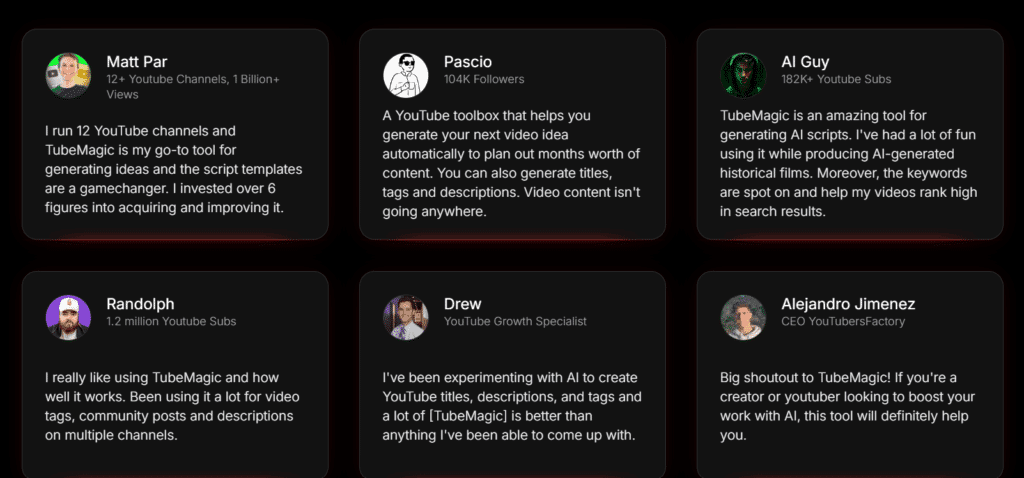
Across verified user reviews and community feedback in 2026:
Positive patterns consistently reported:
- Significant reduction in time spent on scripting (most report 70–80% faster)
- Video ideas that perform better than manually brainstormed concepts
- Improved click-through rates from AI-optimized titles
- Faceless channel creators are particularly positive about the workflow
Criticism patterns consistently reported:
- Scripts require personalization before use — raw AI output lacks specific examples and a personal voice
- Keyword data is not as deep as that of dedicated SEO tools like Ahrefs or SEMrush
- No direct integration with video editing software
- Monthly cost feels high for creators at very early stages with minimal revenue
Honest Pros and Cons
✅ What TubeMagic Does Well
Unlimited generation. No token anxiety. No running out of credits mid-script. Flat monthly fee covers everything — unusual and genuinely valuable compared to credit-based AI tools.
YouTube-specific training. The AI models are trained specifically on high-performing YouTube content. The output understands hooks, retention patterns, and YouTube’s content format in a way that general AI tools don’t replicate.
All-in-one pre-production. Idea generation, keyword research, scripting, and metadata optimization in one platform eliminate the multi-tool workflow most creators piece together from 4–5 different products.
Matt Par’s credibility. The tool is built on the actual systems of someone running 12+ profitable channels. This isn’t theory — it’s a creator’s internal workflow packaged as software.
30-day money-back guarantee. No-questions-asked refund through Digistore24. The financial risk is zero for the first 30 days.
95+ language support. Access to non-English YouTube markets where competition is lower — a genuine competitive advantage most creators overlook.
❌ What TubeMagic Could Improve
No free tier. The absence of a free trial (only a money-back guarantee) means you have to pay before experiencing the product. Most competing tools offer limited free access.
Scripts need heavy editing. While the structure is strong, AI scripts lack personal examples, specific data points, and the creator’s authentic voice. Plan for 20–30 minutes of editing per script, not just direct copy-paste use.
Analytics are limited. TubeMagic isn’t an analytics tool. Channel performance tracking, subscriber growth analysis, and A/B testing require a separate tool.
Price point for beginners. $47/month is a meaningful cost for someone with a channel earning $0–$100/month. The ROI case is strong at scale — harder to justify in the first 3 months of channel building.
Is TubeMagic a Scam?
No — and this is worth addressing directly because the YouTube tools market has many low-quality products.
TubeMagic is a legitimate, actively developed software platform with real features, verifiable user reviews, and a credible creator behind it. It has been updated consistently since its acquisition; the 2026 version includes genuine AI capability improvements, and the Digistore24 money-back guarantee means you’re financially protected.
The tool doesn’t guarantee YouTube success — no software can. What it does is remove the time barrier that prevents most creators from producing content consistently. The results depend entirely on whether you use it.
Who Should Buy TubeMagic in 2026?
Strong yes — buy it if:
- You’re actively running or launching a faceless YouTube channel
- You’re using YouTube as an affiliate marketing traffic source
- You want to scale to multiple channels without proportionally more time
- You’re spending 3+ hours per video on scripting and research
- You can commit to consistent uploads for at least 6 months
Skip it for now if:
- You haven’t decided on a YouTube niche yet
- You’re at an absolute beginner stage with no channel set up
- You’re looking for analytics and performance tracking (VidIQ or TubeBuddy serve that need better)
- You can’t currently justify $47/month from your budget
The Final Verdict
TubeMagic is one of the most legitimate and genuinely useful AI tools in the YouTube creator space in 2026. It solves a real problem — content production bottleneck — with specialized AI that understands YouTube’s format better than general-purpose tools.
The unlimited generation model, YouTube-specific training, and all-in-one workflow make it stand out in a crowded market of overpriced, underperforming YouTube tools.
The honest caveat: it’s a production tool, not a magic button. Your scripts need editing. Your niche needs selecting. Your thumbnails need designing. TubeMagic handles the time-consuming middle part of the workflow — the research, scripting, and metadata — faster and better than doing it manually. The creative direction and quality control remain yours.
For serious faceless channel creators and affiliate marketers using YouTube as a traffic source, the ROI case is strong. For absolute beginners still deciding whether YouTube is the right platform, start with the free strategy first and revisit TubeMagic once you’ve committed to the channel.
Overall Rating: 4.3/5
Frequently Asked Questions
Does TubeMagic replace VidIQ or TubeBuddy? Not fully. TubeMagic excels at content creation — scripting, ideation, metadata. VidIQ and TubeBuddy are stronger for analytics, channel performance tracking, and advanced SEO data. They serve different parts of the workflow.
Is there a free trial? No free trial — but TubeMagic offers a 30-day money-back guarantee, giving you risk-free access to test every feature before committing.
What’s the difference between TubeMagic, Tube Mastery, and Monetization? Tube Mastery is a video course teaching the strategy of building YouTube channels. TubeMagic is the AI software tool that executes that strategy. Both are created by Matt Par. Many serious creators use both — the course provides the roadmap, TubeMagic powers the execution.
Does TubeMagic work for faceless channels? Yes — this is its primary use case. The tool is specifically optimized for faceless content formats, including voiceover-based scripts, stock footage videos, and documentary-style content.
Can beginners use TubeMagic? Yes, but the ROI is stronger for creators with a channel already set up and a niche confirmed. Complete beginners may find it premature before establishing those foundations.
What niches does TubeMagic work best for? Finance, technology, AI, health, business, lifestyle, and educational content — any niche where informational video content is in demand. Works across all languages.
Disclosure: This review may contain affiliate links. If you purchase TubeMagic through links on this page, Musabguide.com may earn a commission at no extra cost to you. This does not influence the review — all opinions are honest and based on direct research, feature testing, and verified user feedback.

Muse is the founder of MusabGuide, covering online business, digital marketing, and AI tools. He creates practical guides and honest reviews to help beginners and entrepreneurs make informed decisions online.